
Arknights: Endfield PC requirements – can your rig handle this UE5 beauty?
CONTENTS
Everything you need to know about running Hypergryph’s factory-driven action RPG smoothly
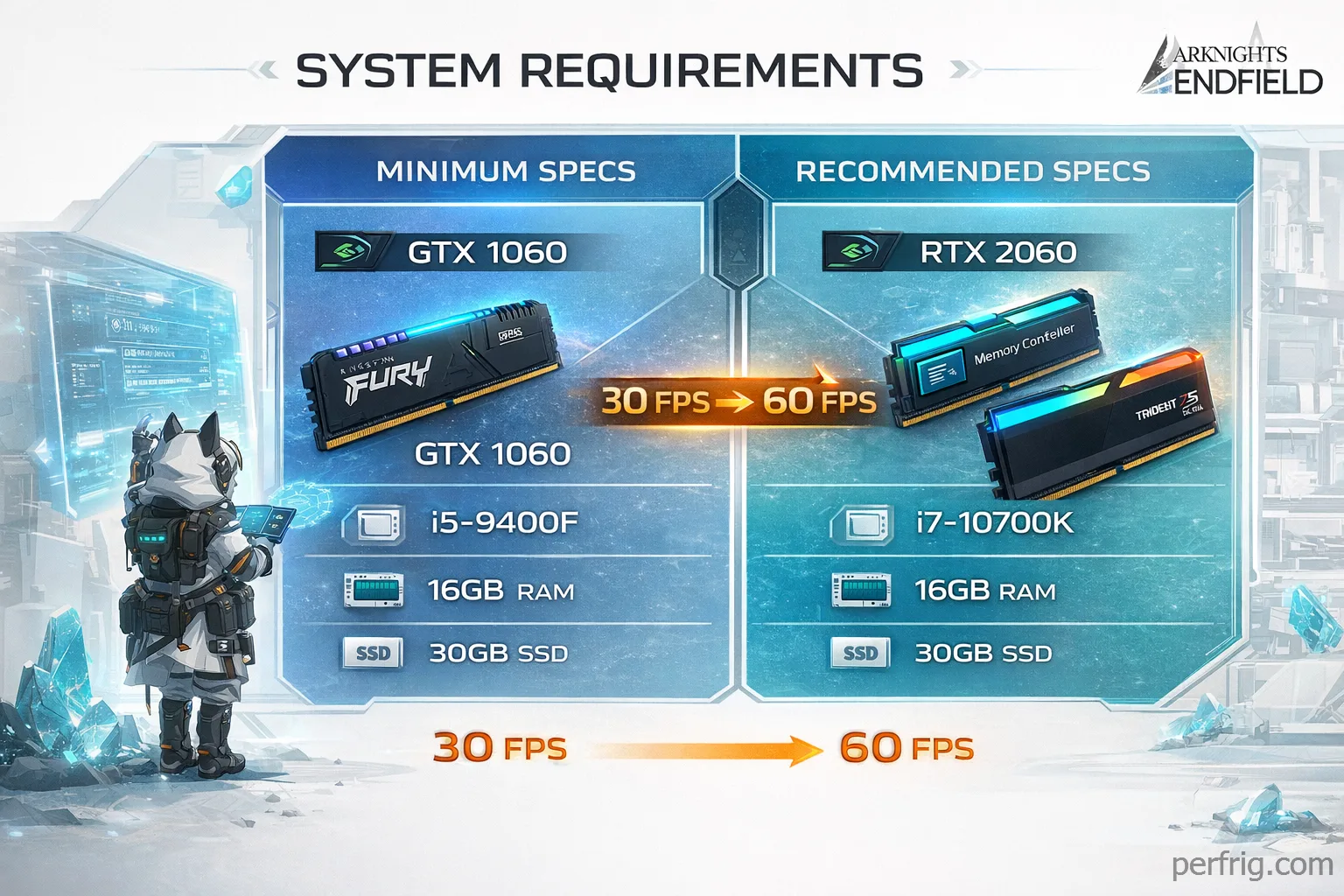
Look, here’s the thing about Arknights: Endfield—it’s built on Unreal Engine 5, which sounds scary for older PCs, but the actual requirements are surprisingly reasonable. You don’t need a monster rig to enjoy this game. The minimum specs target 1080p at 30 FPS on low settings, while recommended specs push you toward 1080p at 60 FPS with medium-high visuals. That’s genuinely accessible for most gaming PCs from the last five years.
The catch? You absolutely need an SSD and 16GB of RAM minimum. Those aren’t suggestions—they’re hard requirements. The semi-open world design means constant asset streaming, and a traditional hard drive will turn region transitions into painful waiting sessions. Similarly, 8GB of RAM just won’t cut it here. The game will launch, sure, but expect stuttering and crashes during intensive sequences.
Honestly, if you’re sitting on the fence about whether your PC can handle Endfield, the answer is probably yes if you built or upgraded anytime after 2019. The GTX 1060 minimum requirement is an eight-year-old mid-range card that still ranks among Steam’s most popular GPUs. The Intel i5-9400F is equally old. This isn’t Cyberpunk 2077 demanding bleeding-edge hardware—it’s a thoughtfully optimized game that respects players with older systems.
Minimum specifications breakdown
The official minimum specs call for Windows 10 64-bit, an Intel Core i5-9400F or equivalent AMD processor, 16GB RAM, and an NVIDIA GTX 1060 6GB or AMD RX 580. Storage demands 50GB on an SSD, plus another 40GB temporarily during installation for unpacking files.
These specs target 1080p resolution at 30 FPS with settings on low. That’s playable, but not ideal if you care about smooth visuals or competitive content. The 30 FPS target feels sluggish during fast combat sequences, and low settings strip away much of what makes Endfield visually impressive. You’ll see flat textures, minimal shadows, and reduced draw distances.
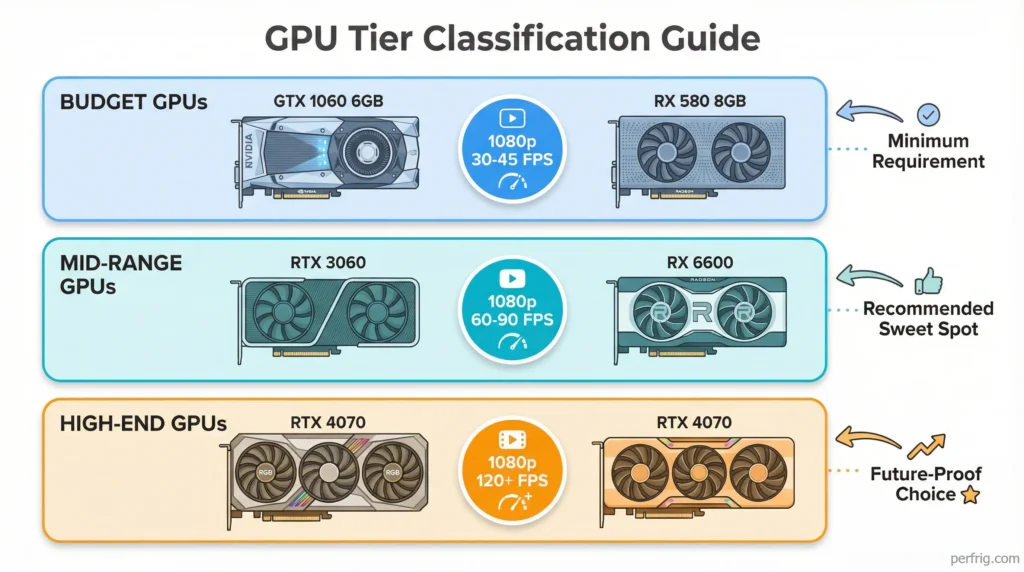
The GPU requirement is the easiest to meet. A GTX 1060 6GB remains widely used and can be found for under $150 on the used market. AMD’s RX 580 performs similarly and often costs even less. If you own anything from the GTX 1650 Super or RX 5500 XT generation onward, you’re already above minimum specs.
The CPU requirement is also forgiving. An i5-9400F is a six-core processor from 2019 that handles most modern games adequately. If you’re running an 8th or 9th generation Intel chip, you’re good to go. AMD equivalents include the Ryzen 5 2600 or better. The game doesn’t hammer CPUs with excessive calculations, so even slightly older chips perform acceptably.
RAM is where budget systems might struggle. Many older PCs still run 8GB, which technically launches the game but causes constant memory warnings and crashes. Upgrading from 8GB to 16GB typically costs $30-50 for DDR4 and transforms the experience. If you’re using DDR5, prices are higher, but the performance improvement justifies the cost.
Storage requirements are straightforward but inflexible. You need 50GB for the game plus 40GB temporarily during installation. More importantly, an SSD is mandatory—not recommended, mandatory. Traditional hard drives cause severe stuttering during exploration as the game streams assets. A basic 500GB SATA SSD costs under $40 and makes every game you own load faster, not just Endfield.
Recommended specifications for better performance
Hypergryph’s recommended specs suggest an Intel Core i7-10700K or AMD Ryzen 7 3700X, 32GB RAM, and an NVIDIA RTX 2060 Super or AMD RX 5600 XT. These target higher resolutions or frame rates, though the exact performance goals aren’t officially specified.
Based on community testing, recommended specs comfortably achieve 1080p at 60 FPS with high settings, or 1440p at 60 FPS with medium settings. The jump to an RTX 2060 Super from a GTX 1060 provides roughly double the performance, enabling significantly better visuals without frame rate compromises.
The CPU upgrade to an i7-10700K or Ryzen 7 3700X offers more cores and higher clock speeds. This matters during complex factory automation sequences where the game calculates resource flows across dozens of machines simultaneously. The difference isn’t dramatic during simple exploration, but intense combat scenarios with multiple enemies and particle effects benefit noticeably.
The 32GB RAM recommendation feels excessive for most players. Community reports consistently show 16GB handles everything smoothly at 1080p and even 1440p. The 32GB suggestion likely targets 4K resolution or extreme multitasking scenarios. Unless you’re running recording software, streaming, and have fifty browser tabs open simultaneously, 16GB is genuinely sufficient. Save that RAM budget for a better GPU instead.
Storage remains 50GB on an SSD with no changes. However, faster SSDs improve experience quality. A basic SATA SSD loads regions in 8-10 seconds, while NVMe drives cut that to 5-7 seconds. The difference matters when you’re frequently moving between zones during exploration sessions.
Platform differences worth considering
PlayStation 5 runs Endfield at native 4K resolution with stable 60 FPS performance. The PS5 version received extensive optimization and rarely drops frames even during intensive sequences. Ray tracing appears in select scenes, though it’s subtle and doesn’t dramatically transform visuals. Controller support feels natural and responsive.
Mobile requirements split between iOS and Android. iOS demands iPhone 11 or newer with an A13 Bionic chip minimum. Recommended specs suggest iPhone 13 Pro or newer with A15 Bionic for stable performance. Storage needs 25-28GB depending on voice language packs. Android requires Snapdragon 855, Dimensity 1000, or Kirin 990 processors with 6GB RAM minimum. Recommended specs bump to Snapdragon 870 or better with 8GB RAM.
Honestly, mobile performance varies wildly. Flagship phones from 2024-2025 handle medium-high settings acceptably, but anything older requires significant compromises. Battery drain is substantial—expect 2-3 hours maximum during active play. If you primarily game on mobile, consider whether your device realistically handles demanding titles before committing.
Cross-save functionality works flawlessly across all platforms through Gryphline account linking. You can start playing on PC at home, continue on PS5, then switch to mobile during your commute without losing progress. The seamless platform switching is genuinely one of Endfield’s best features.
Graphics settings that actually matter
Understanding which settings impact performance helps optimize your experience. Shadow quality has the single largest performance impact. Dropping shadows from ultra to medium typically gains 15-20 FPS without drastically reducing visual quality. Shadows still exist and look decent—they’re just less detailed.
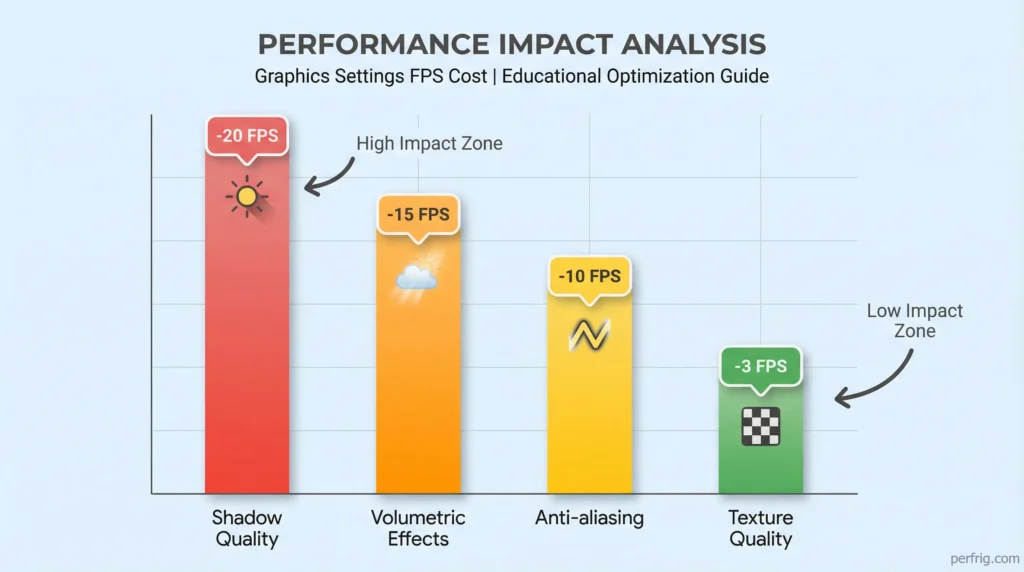
Volumetric fog and lighting effects rank second for performance impact. These atmospheric effects look beautiful but hammer GPUs hard. Reducing volumetric quality from high to medium gains 10-15 FPS while maintaining overall visual atmosphere. You’ll notice slightly less dramatic lighting, but the tradeoff is worthwhile for frame rate stability.
Anti-aliasing comes third. TAA (temporal anti-aliasing) on high eliminates jagged edges but costs 8-12 FPS. Switching to medium or using FXAA instead maintains relatively clean visuals while recovering significant performance. Unless you’re extremely sensitive to aliasing, medium anti-aliasing represents the sweet spot.
Texture quality surprisingly has minimal performance impact on systems with adequate VRAM. If your GPU has 6GB or more, running textures on high or ultra costs only 2-3 FPS compared to medium. The visual improvement is noticeable, making this one setting worth maximizing even on mid-range hardware.
View distance and LOD (level of detail) settings affect CPU more than GPU. Reducing view distance from ultra to high helps systems with older CPUs maintain stable frame rates during exploration. The difference is barely noticeable during normal play but prevents frame drops when viewing expansive vistas.
Upscaling technologies and their benefits
NVIDIA DLSS support represents a game-changer for RTX GPU owners. DLSS uses AI upscaling to render games at lower internal resolutions while outputting at native resolution. Quality mode maintains visual fidelity nearly identical to native rendering while gaining 20-30% performance. Balanced mode pushes performance gains to 40-50% with minimal visual compromise.
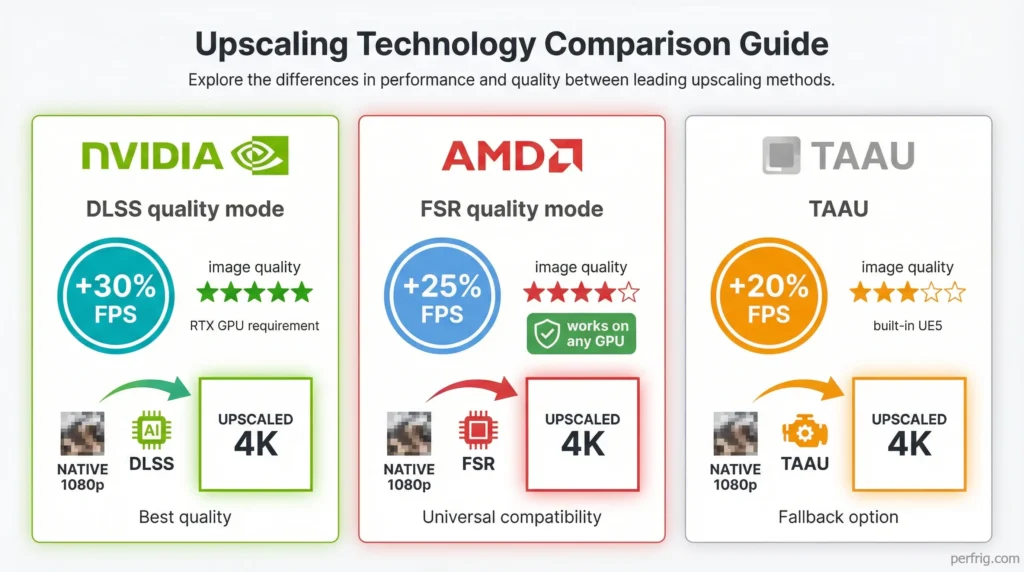
DLSS 4 with Multi Frame Generation is available on RTX 40-series cards. Frame Generation creates additional frames between real rendered frames, dramatically improving perceived smoothness. However, it introduces slight input latency, making it less ideal for competitive content. For casual exploration and story missions, Frame Generation transforms 60 FPS into 90-120 FPS smoothness.
AMD FSR (FidelityFX Super Resolution) works on any GPU, including NVIDIA cards. FSR provides similar upscaling benefits to DLSS but typically with slightly lower image quality. Quality mode offers modest performance gains of 15-25%, while performance mode pushes 40-60% gains at the cost of some visual clarity. FSR is perfectly viable if you don’t have an RTX card.
TAAU (Temporal Anti-Aliasing Upscaling) serves as the platform-agnostic option built into Unreal Engine 5. It works on all GPUs but delivers lower image quality than DLSS or FSR. Performance gains range from 15-35% depending on settings. If you’re struggling with performance and don’t have access to DLSS or FSR, TAAU provides a functional fallback.
Sharpening options accompany upscaling technologies. DLSS includes built-in sharpening that helps recover detail lost during upscaling. FSR benefits from manual sharpening adjustments in graphics settings. Finding the right balance prevents the overly soft look that aggressive upscaling sometimes creates.
Practical upgrade recommendations
If you’re considering hardware upgrades specifically for Endfield, prioritize GPU first. Moving from a GTX 1060 to an RTX 3060 or RX 6600 transforms the experience dramatically. These mid-range modern cards handle 1080p maxed settings at 90+ FPS or 1440p high settings at 60+ FPS comfortably. Prices have normalized after years of scarcity, making this the most impactful upgrade.
RAM upgrades make sense only if you currently have 8GB. Jumping from 8GB to 16GB is transformational. Jumping from 16GB to 32GB provides minimal benefit for gaming alone. Unless you frequently run memory-intensive applications alongside gaming, stick with 16GB and allocate that budget elsewhere.
CPU upgrades typically offer the least gaming performance improvement per dollar spent. If you’re running a 9th generation or newer Intel chip, or Ryzen 2000 series or newer, upgrading won’t dramatically improve Endfield specifically. However, if you’re still on 6th or 7th generation Intel, or first-generation Ryzen, a CPU upgrade benefits your entire system across all applications.
SSD upgrades from traditional hard drives are non-negotiable if you want to play Endfield. Moving from SATA SSD to NVMe SSD provides diminishing returns—nice to have, but not transformational. Prioritize getting any SSD first, then consider NVMe as a future luxury upgrade.
Monitor considerations matter too. If you’re running 1080p 60Hz, that’s perfectly fine for Endfield. Upgrading to 1080p 144Hz provides smoother motion during combat but requires hardware capable of pushing those frame rates. 1440p monitors look noticeably sharper but demand significantly more GPU power. Know your hardware capabilities before upgrading displays.
The bottom line on requirements
Arknights: Endfield respects players with older hardware while scaling beautifully for those with modern rigs. A PC from 2019-2020 with a GTX 1060, 16GB RAM, and an SSD runs the game acceptably. A mid-range 2023-2024 system with an RTX 4060 or RX 7600 crushes it at high settings. The game’s accessibility is genuinely impressive for an Unreal Engine 5 title.
The mandatory SSD requirement and 16GB RAM floor are reasonable asks in 2026. These represent baseline standards for modern gaming rather than excessive demands. If you’re still running 8GB RAM or a hard drive, Endfield provides motivation to upgrade components that benefit every game you play.
For those wondering if their specific PC can run Endfield, check your GPU and RAM first. If you meet those minimums, you’re probably fine. CPU requirements are forgiving enough that most systems from the last five years pass easily. Storage is binary—either you have an SSD or you don’t. Simple as that.
If you want more detailed information about Endfield’s gameplay systems, platforms, and features beyond just system requirements, check our comprehensive guide covering everything about the game.

Amed Parker
PC performance and hardware specialist focused on system optimization and component analysis with real world performance testing. I combine hardware knowledge with tuning expertise to deliver stable and efficient results.