
Best Intel motherboards 2026: Z890 vs B860 buying guide (Part 2)
CONTENTS
Part 1 of this guide covered Intel chipset differences and specific motherboard recommendations across different budgets. Part 2 dives into detailed Z890 vs B860 feature comparisons, CPU pairing strategies, platform considerations, and the Intel vs AMD decision.
Key features comparison: Z890 vs B860
Understanding chipset differences prevents overspending on features that don’t affect your use case.
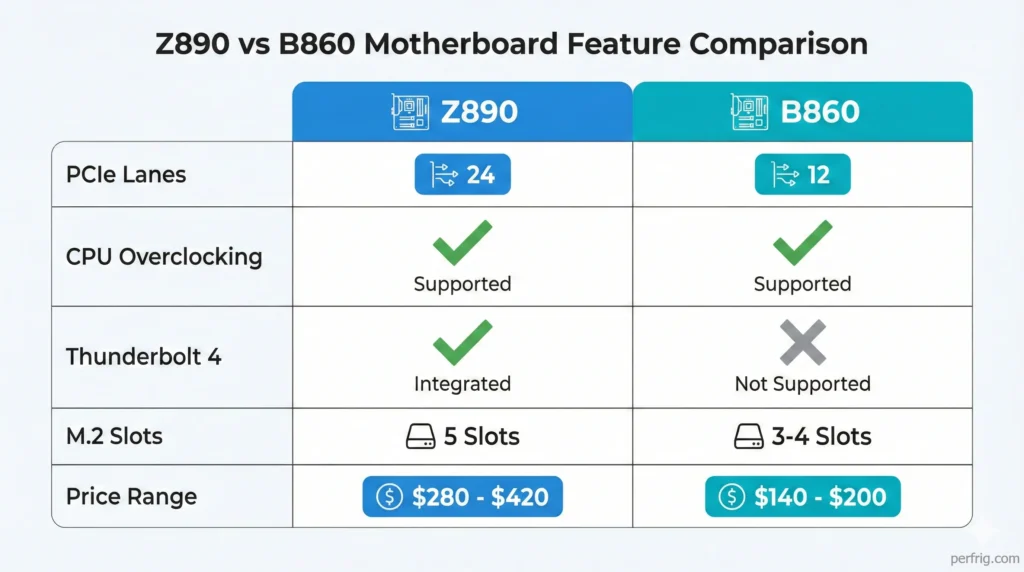
Overclocking support: Both Z890 and B860 support full CPU and memory overclocking. This represents a significant change from previous Intel platforms where B-series chipsets locked CPU multipliers. If overclocking matters to you, B860 no longer forces you into Z890.
PCIe lanes and expansion: Z890 provides 24 chipset PCIe lanes enabling five M.2 slots, extensive USB connectivity, and additional expansion cards. B860 offers 12 lanes supporting 3-4 M.2 slots and adequate USB ports. For most single-GPU gaming builds, B860’s connectivity suffices.
Thunderbolt 4 and USB4: Z890 boards typically include at least one Thunderbolt 4 or USB4 port delivering 40Gbps bandwidth. B860 boards generally omit this feature. If you use fast external SSDs, Thunderbolt docking stations, or require USB4 connectivity, Z890 becomes necessary. Most gamers never utilize these capabilities.
VRM and build quality: Z890 boards generally include more robust VRM designs and premium components. Quality B860 boards from reputable manufacturers provide adequate power delivery for mainstream processors, but extreme overclocking on Core Ultra 9 chips favors Z890’s beefier designs.
The practical decision: Choose B860 for Core Ultra 5/7 gaming builds where you don’t need Thunderbolt or extensive expansion. Pick Z890 for Core Ultra 9 processors, extreme overclocking, or professional workloads requiring maximum connectivity.
CPU pairing recommendations
Matching motherboard tier to CPU choice optimizes value without leaving performance on the table.
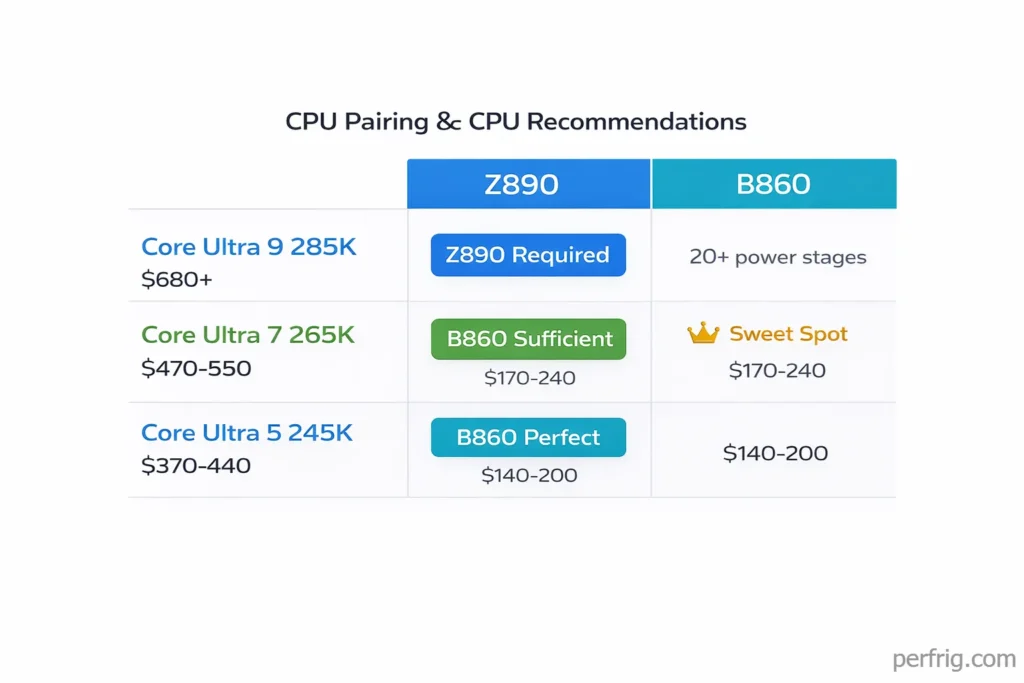
Core Ultra 9 285K: Pair with quality Z890 boards. This processor draws significant power under all-core loads and benefits from robust VRM designs. The ASUS ROG Hero or MSI Tomahawk deliver the power delivery and cooling needed for sustained performance.
Core Ultra 7 265K / 265KF: B860 boards like the Gigabyte Aorus Elite handle these processors perfectly. Save money on the motherboard and invest in faster DDR5 or a better GPU. The MSI Tomahawk makes sense if you need Thunderbolt or extensive M.2 slots, but B860 delivers identical gaming performance.
Core Ultra 5 245K: Budget B860 boards provide everything needed. These processors sip power and don’t stress even entry-level VRMs. Spending $300+ on a motherboard for a $280 CPU makes no financial sense unless you need specific premium features.
The Core Ultra 7 265K deserves special attention. Our CPU buying guide details why the Core Ultra 7 265K offers exceptional value for gaming builds. It’s Intel’s best value gaming CPU on Arrow Lake, delivering 90% of the 285K’s gaming performance at 65% of the cost. Pairing it with a $400 Z890 board wastes money better spent on GPU or storage upgrades.
Platform considerations and memory
Arrow Lake requires DDR5 exclusively—DDR4 support disappeared with this generation. DDR5-6000 CL30 represents the sweet spot, providing optimal performance at reasonable pricing. DDR5-6400 offers 1-2% gains for 15-20% price premium. DDR5-7200+ speeds provide bragging rights but negligible real-world gaming improvements.
Memory compatibility has improved significantly since Arrow Lake’s launch. Current BIOS versions (late 2025 and newer) reliably boot quality DDR5-6000 and DDR5-6400 kits at XMP speeds. Budget boards sometimes require manual voltage adjustments, but mainstream and premium options handle memory training without intervention.
Cooling requirements for Arrow Lake match or exceed previous Intel generations. Core Ultra 9 processors draw 250W+ under sustained all-core loads despite lower gaming power consumption. Quality tower coolers with 200W+ capacity or 240mm AIO liquid coolers maintain proper thermals. Budget 120mm coolers struggle with sustained workloads.
Power supply requirements depend on total system configuration. A Core Ultra 7 with RTX 4070 class GPU runs fine on quality 650W units. Core Ultra 9 with RTX 4090 should pair with 850W or higher, particularly if planning any overclocking.
Intel vs AMD: Arrow Lake or AM5?
Choosing between Intel Arrow Lake and AMD AM5 involves weighing current performance against platform longevity and upgrade paths.
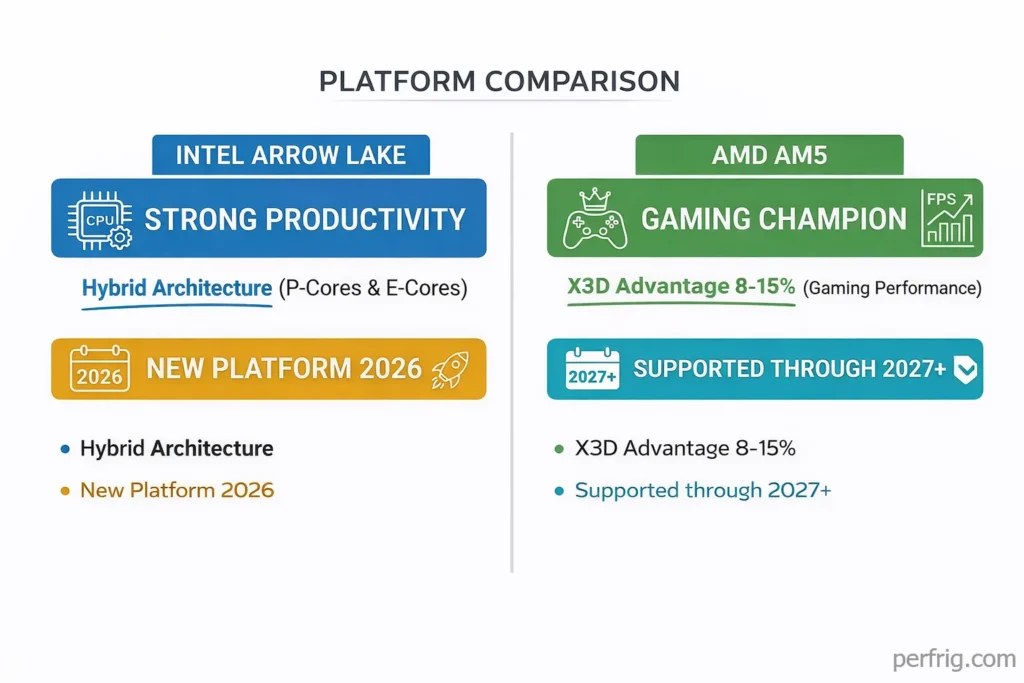
Gaming performance: AMD’s X3D processors—particularly the 7800X3D and 9800X3D—dominate gaming benchmarks. Our 9800X3D review shows how AMD’s 3D V-Cache technology delivers gaming performance leads over Intel. Intel’s Core Ultra chips deliver competitive performance in most titles but trail X3D chips by 8-15% on average. If maximum gaming FPS is your priority, AMD currently holds the advantage.
Productivity performance: Intel maintains leads in heavily threaded workloads where Arrow Lake’s efficiency cores contribute meaningfully. Content creators running rendering, video encoding, or compilation tasks often benefit from Intel’s hybrid architecture.
Platform longevity: AMD has confirmed AM5 support through at least 2027 with Zen 6 processors. Our AM5 motherboard guide covers AMD’s platform in detail for those considering Ryzen builds. Intel historically changes sockets every two generations. Arrow Lake will likely receive one refresh before a new platform arrives. If long-term upgradeability matters, AM5 provides stronger future-proofing.
Pricing and value: B860 and Z890 boards cost similar amounts to comparable B650 and X670 options. AMD’s advantage comes from competitive CPU pricing and the 7800X3D’s exceptional gaming value at $400-450.
The honest assessment: For pure gaming builds, AMD’s X3D processors offer better value. For mixed workloads combining gaming and productivity, Intel remains competitive. Choose based on your actual usage patterns rather than brand loyalty.
Common buying mistakes
Several pitfalls trap first-time builders or those upgrading after years away from PC building.
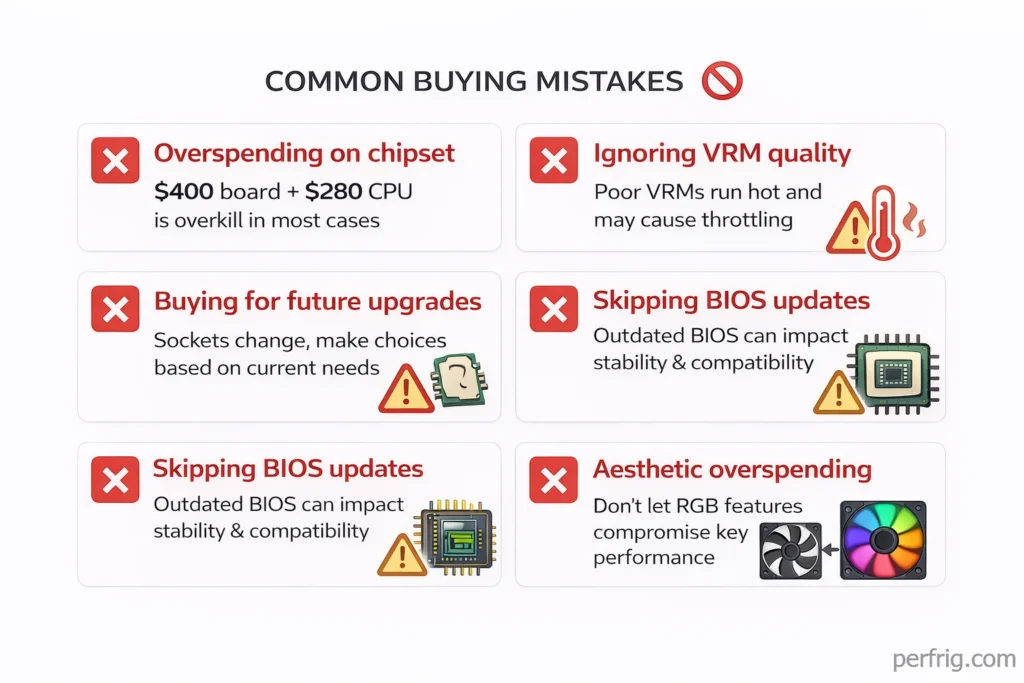
Overspending on chipset: A Core Ultra 5 245K paired with a $400 Z890 board makes no sense. The CPU’s capabilities don’t justify premium motherboard features. Match board tier to processor class—budget CPU gets budget board, flagship CPU gets flagship board.
Ignoring VRM quality: Phase count marketing misleads buyers. A 12-phase design with quality components and proper cooling outperforms a 16-phase board with inadequate heatsinks. Check professional reviews for VRM temperature testing rather than trusting manufact urer specifications.
Buying for future upgrades: Purchasing a Z890 board “for future CPU upgrades” rarely pays off. Intel typically changes sockets every 2-3 years. By the time you’re ready to upgrade, a new platform with better features will exist. Buy for the CPU you’re installing today, not hypothetical future processors.
Skipping BIOS updates: Arrow Lake launched with rough BIOS implementations. Memory compatibility, stability, and performance have improved significantly through updates. Before building, update to the latest stable BIOS using BIOS Flashback. Don’t rely on out-of-box BIOS versions from manufacturing dates.
Aesthetic overspending: RGB lighting, integrated LCD screens, and decorative shrouds don’t affect performance. If your case has a closed panel or you don’t care about aesthetics, save money on boards prioritizing function over form.
WiFi vs ethernet considerations
Most modern motherboards include WiFi, but deciding between WiFi and ethernet-only boards affects both cost and connectivity.
WiFi 7 appears on most Z890 boards and many B860 options. The technology promises 5.8Gbps theoretical speeds and improved latency over WiFi 6E. Practically, WiFi 7’s benefits remain minimal until compatible routers become common and affordable. WiFi 6E delivers sufficient performance for gaming—latency differences are negligible in real-world scenarios.
Ethernet remains superior for competitive gaming where every millisecond matters. Wired connections provide lower latency, more stable packet delivery, and eliminate wireless interference. If your gaming setup allows ethernet cabling, skip WiFi-equipped boards and save $20-30.
2.5GbE and 10GbE networking appear on mainstream and premium boards respectively. For gaming, standard gigabit ethernet suffices—games rarely utilize more than 100Mbps bandwidth. Faster networking matters for large file transfers, network storage, or home lab scenarios.
Storage configuration strategies
Arrow Lake boards support multiple M.2 drives, but proper configuration maximizes performance and value.
Primary drive: Install your Gen5 NVMe SSD in the first M.2 slot connected directly to the CPU. This ensures maximum bandwidth for your boot drive and frequently accessed games. Gen5 drives deliver 14GB/s sequential reads versus Gen4’s 7GB/s—meaningful for DirectStorage-enabled games.
Secondary drives: Use Gen4 SSDs in remaining M.2 slots. The price premium for Gen5 on secondary storage rarely justifies the cost. Gen4 drives deliver adequate performance for game libraries, media storage, and general files.
SATA drives: Many boards include 4-6 SATA ports. These work fine for mechanical hard drives used as bulk storage but show their age for active game installations. SATA SSDs remain viable for older systems but new builds should prioritize NVMe.
RAID configurations: Consumer motherboards support RAID 0/1/5/10, but for gaming systems, RAID adds complexity without meaningful benefits. Individual drives with proper backups provide simpler, more reliable storage.
The bottom line
The best Intel motherboard depends on your CPU choice and feature requirements. Clear recommendations from Part 1 remain:
Best Premium: ASUS ROG Maximus Z890 Hero ($380-$420) for Core Ultra 9 285K builds
Best Overall: MSI MAG Z890 Tomahawk WiFi ($280-$320) for Core Ultra 7 with premium features
Best Budget: Gigabyte B860 Aorus Elite AX ($180-$200) for Core Ultra 5/7 value builds
Best Mini-ITX: ASRock Z890I Lightning WiFi ($260-$280) for compact systems
Choose your motherboard based on the CPU you’re actually buying and features you’ll genuinely use. A Core Ultra 7 265K paired with a Gigabyte B860 board delivers identical gaming performance to the same CPU in an ASUS ROG Hero—save the $200 difference for a better GPU or more storage.
Arrow Lake represents Intel’s most competitive gaming platform in years, though AMD’s X3D chips maintain performance leads. The motherboard market offers solid options across all price tiers. Match your board to your processor, prioritize features you’ll actually use, and build smart rather than expensive.
DDR5-6000 memory, a quality B860 or Z890 board appropriate to your CPU tier, and proper cooling matter more than having the absolute best motherboard money can buy. Focus your budget on components that directly affect gaming performance—GPU, CPU, and fast storage—rather than premium motherboard features you’ll rarely utilize.

Amed Parker
PC performance and hardware specialist focused on system optimization and component analysis with real world performance testing. I combine hardware knowledge with tuning expertise to deliver stable and efficient results.