
PCIe 4.0 vs PCIe 5.0 for gaming: when the upgrade actually matters
CONTENTS
You’re building a new PC or upgrading components, and suddenly you’re staring at motherboard specs listing “PCIe 5.0 support.” Your current GPU runs fine on PCIe 3.0. Do you need PCIe 4.0? Should you wait for PCIe 5.0 to become standard? Does any of this actually impact gaming performance?
Here’s the honest answer: for most gamers in 2026, PCIe 4.0 delivers everything you need. PCIe 5.0 matters for specific use cases—primarily NVMe SSDs taking advantage of DirectStorage—but GPU performance differences remain negligible. Understanding when each generation matters helps you avoid overpaying for features you won’t use.
This guide breaks down what PCIe generations actually do, where real-world performance differences appear, and which specification matters for your build.
What PCIe generations actually mean
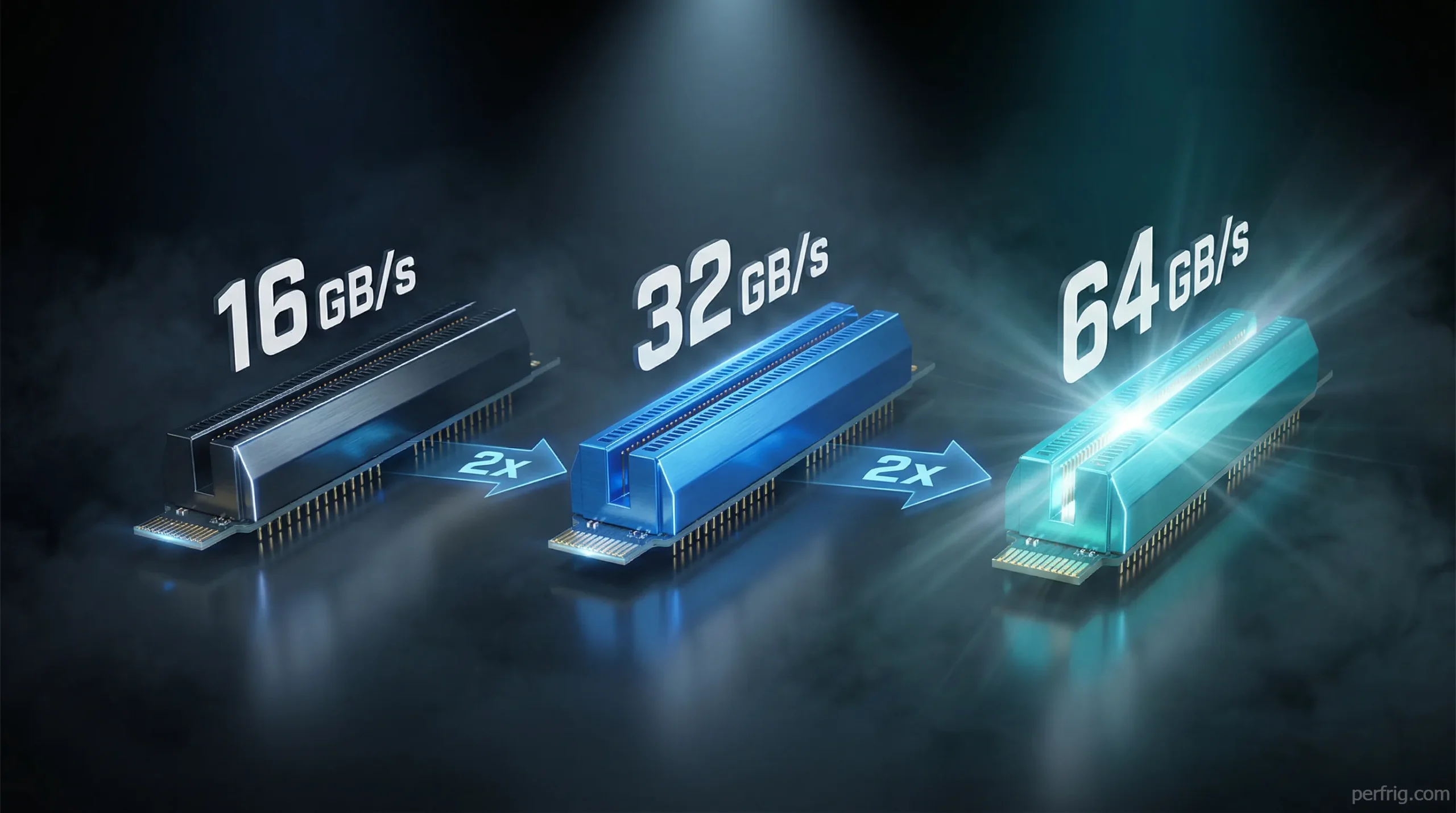
PCIe (Peripheral Component Interconnect Express) determines how fast data moves between your motherboard and components like GPUs, SSDs, and expansion cards. Each generation doubles bandwidth compared to the previous one.
PCIe bandwidth per lane:
PCIe 3.0: ~1 GB/s per lane PCIe 4.0: ~2 GB/s per lane
PCIe 5.0: ~4 GB/s per lane
Graphics cards typically use 16 lanes (x16 slot). A PCIe 4.0 x16 slot provides roughly 32 GB/s bandwidth. PCIe 5.0 x16 doubles that to 64 GB/s. Sounds massive, right?
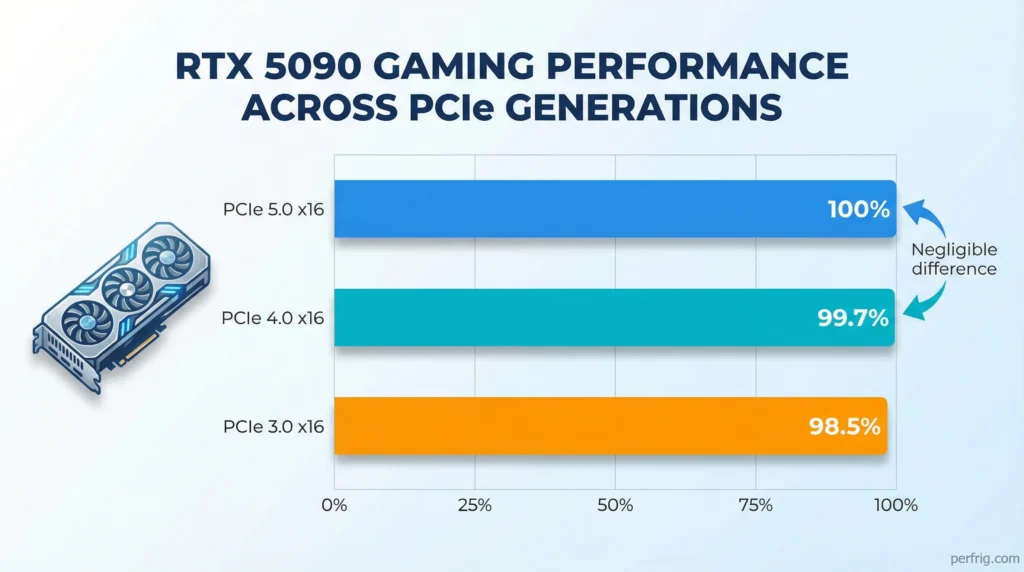
The catch: current GPUs don’t fully utilize even PCIe 4.0 bandwidth. The RTX 5090—NVIDIA’s flagship requiring the most bandwidth—still performs identically on PCIe 4.0 versus 5.0 in gaming workloads. GPU architectures haven’t evolved to need that much data transfer speed yet.
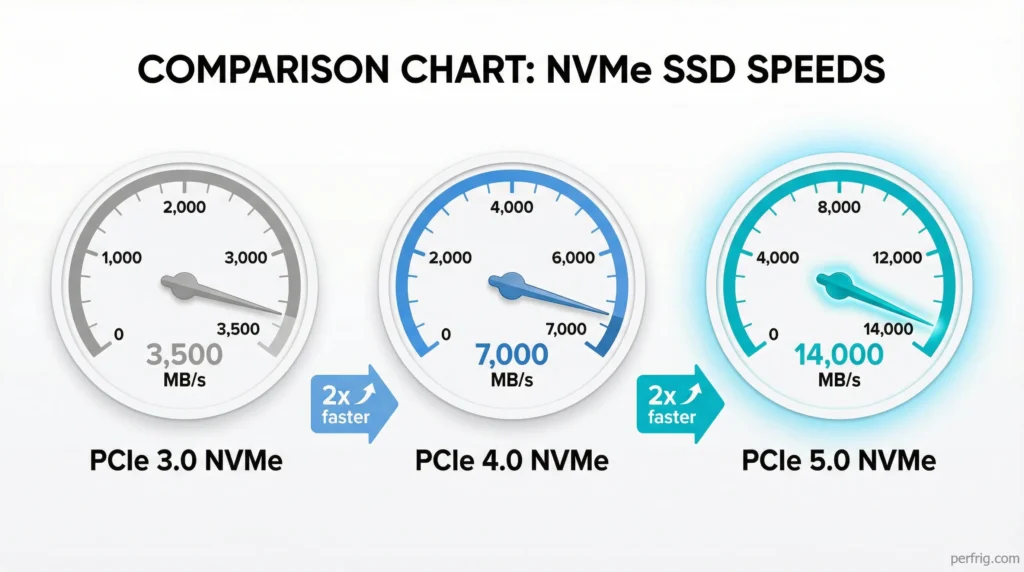
SSDs tell a different story. Modern PCIe 5.0 NVMe drives hit 14,000 MB/s reads, twice the speed of PCIe 4.0’s limit around 7,500 MB/s. Whether games actually benefit from that speed is complicated—we’ll address it shortly.
GPU performance: the numbers don’t lie
Multiple independent tests from TechPowerUp, Gamers Nexus, and Hardware Unboxed confirm the same conclusion: GPUs see minimal performance difference between PCIe generations in real-world gaming.
RTX 5090 testing (4K, max settings):
PCIe 5.0 x16: 100% baseline PCIe 4.0 x16: 99.7% performance PCIe 3.0 x16: 98.5% performance
Even dropping to PCIe 3.0—two generations old—costs maybe 1-2% average FPS. That’s 2-3 frames at 150 FPS, imperceptible during actual gameplay.
Mid-range GPUs show even less difference. The RTX 5070 Ti and RX 7800 XT perform identically on PCIe 3.0 and 4.0. These cards don’t push enough data to saturate older interfaces.
The exception emerges at PCIe 3.0 x8 (8 lanes instead of 16). Some high-end GPUs lose 3-5% performance in demanding titles. This matters if you’re running multiple GPUs or using motherboard slots that drop to x8 mode when populated. Standard single-GPU builds avoid this issue entirely.
Bottom line: PCIe generation doesn’t bottleneck GPU gaming performance. Your graphics card performance depends on GPU architecture, VRAM capacity, and clock speeds—not PCIe bandwidth.
NVMe SSDs: where PCIe 5.0 actually matters
Storage tells a completely different story. PCIe 5.0 NVMe drives deliver genuine speed improvements over PCIe 4.0—in specific scenarios.
Sequential read speeds:
PCIe 3.0 NVMe: ~3,500 MB/s PCIe 4.0 NVMe: ~7,000 MB/s PCIe 5.0 NVMe: ~14,000 MB/s
Doubling read speeds sounds incredible. For large file transfers, professional workloads, and video editing, it genuinely is. Gaming? More nuanced.
Traditional game loading relies mostly on small random reads, not sequential speeds. A PCIe 3.0 NVMe already loads most games within seconds of PCIe 4.0 drives. The 2-3 second difference between 3,500 MB/s and 7,000 MB/s reads barely registers during actual play sessions.
DirectStorage changes this calculation. Microsoft’s DirectStorage API—supported in Windows 11—allows games to stream assets directly from NVMe to GPU VRAM, bypassing CPU decompression. Games built for DirectStorage benefit substantially from faster SSDs.
Early DirectStorage implementations like Forspoken and Ratchet & Clank: Rift Apart show 30-40% faster load times on PCIe 4.0 versus 3.0 drives. As more games adopt DirectStorage in 2026 and beyond, that gap will likely widen.
PCIe 5.0 SSDs push this further. With DirectStorage fully leveraged, 14,000 MB/s drives could reduce load times to near-instantaneous levels—assuming game developers optimize for it.
DirectStorage: the PCIe 5.0 wildcard
DirectStorage represents the biggest reason PCIe 5.0 might matter for gaming in the next 2-3 years. But “might” does heavy lifting here.
DirectStorage adoption remains slow. Two years after launch, fewer than 10 games support it properly. Most major releases still rely on traditional storage APIs that don’t fully utilize even PCIe 4.0 speeds.
Game developers face challenges implementing DirectStorage. It requires rethinking asset streaming pipelines and testing across various hardware configurations. The performance gains—primarily faster loading and smoother streaming—don’t market as compellingly as “higher frame rates” or “better graphics.”
Will DirectStorage become standard? Probably, eventually. Next-gen consoles (PS5, Xbox Series X) use SSD streaming architectures similar to DirectStorage, pushing developers to build games around fast storage. As cross-platform titles adopt these techniques, PC gaming will benefit.
But “eventually” doesn’t mean “right now.” If you’re building a PC today, a good PCIe 4.0 NVMe drive delivers excellent performance for current games. PCIe 5.0 SSDs offer future-proofing—at a premium price—for games that might leverage that speed in 2027 and beyond.
Motherboard considerations: what you’re actually paying for
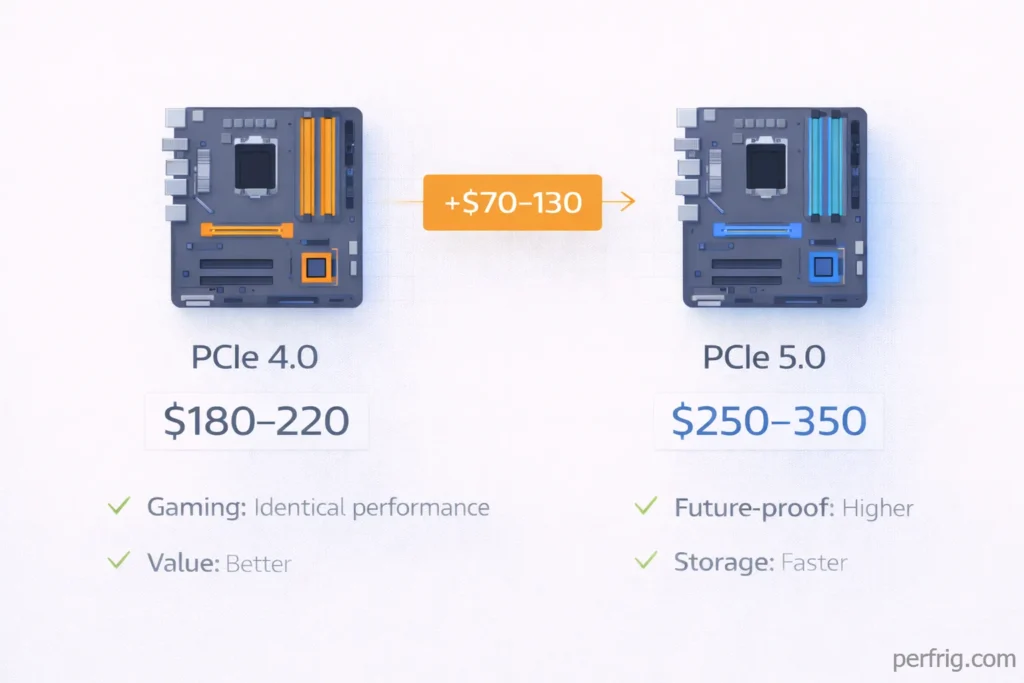
Here’s where PCIe generations get expensive. Motherboards supporting PCIe 5.0 cost $50-150 more than PCIe 4.0 equivalents with similar feature sets.
Price comparison (Z890 chipset):
PCIe 4.0 motherboard: $180-220 PCIe 5.0 motherboard: $250-350
You’re paying extra for PCIe 5.0 GPU slots and M.2 slots. Most Z890 boards offer PCIe 5.0 on the primary x16 slot and one M.2 slot, with remaining slots using PCIe 4.0 or 3.0.
Given that GPUs don’t benefit from PCIe 5.0, you’re essentially paying for one fast M.2 slot. Whether that justifies $100+ depends on your storage needs and timeline.
Budget and mid-range motherboards (B860, B650) typically stick with PCIe 4.0 across all slots. These boards deliver identical gaming performance to premium PCIe 5.0 models for most users.
The exception: if you’re building a high-end workstation doing heavy video editing, 3D rendering, or large dataset processing, PCIe 5.0 storage provides measurable productivity gains. For pure gaming? The cost doesn’t match the benefit.
Future-proofing: should you buy PCIe 5.0 now?
“Future-proofing” in PC hardware is tricky. Technology evolves, but predicting what you’ll actually need in 3-4 years involves guesswork.
Arguments for PCIe 5.0:
DirectStorage adoption will increase Next-gen GPUs (2027-2028) might utilize higher bandwidth
PCIe 5.0 SSDs dropping in price You’re building a high-end system meant to last 5+ years
Arguments against PCIe 5.0:
Current performance gains are minimal Premium pricing doesn’t match gaming benefits PCIe 4.0 likely sufficient through 2028 for most games Better to spend budget on faster GPU or more RAM now
Honestly? If you’re building in 2026, PCIe 4.0 represents the sweet spot. You get excellent performance today, reasonable motherboard costs, and mature driver support. Spending extra for PCIe 5.0 buys potential future benefits that may or may not materialize in your system’s useful lifespan.
That said, high-end builders chasing maximum performance should consider PCIe 5.0 motherboards paired with fast NVMe drives. As DirectStorage games become common, you’ll be ready. Just understand you’re paying a premium for “ready” versus “necessary.”
The Bottom Line
PCIe generations matter far less for gaming than marketing suggests. GPUs perform identically on PCIe 4.0 and 5.0. The meaningful difference appears in NVMe SSD speeds—and only in games leveraging DirectStorage, which remain uncommon in 2026.
Practical recommendations:
Building new PC: Choose PCIe 4.0 motherboard with good VRM and features. Save money for better GPU.
Upgrading motherboard: Don’t upgrade solely for PCIe 5.0. Performance gains don’t justify the cost.
Buying SSD: PCIe 4.0 NVMe drives offer best value. PCIe 5.0 models make sense if you’re betting on DirectStorage adoption.
Already have PCIe 3.0: Don’t worry. Your GPU runs fine. Upgrade when you need new platform, not just for PCIe generation.
The most important factor in gaming performance remains your GPU, followed by CPU and RAM speed. PCIe generation ranks far down that list. Spend your budget where it impacts gameplay, not on bandwidth you won’t use.
Your games load quickly, your GPU hits high frame rates, and you saved money compared to chasing the latest specification. That’s what actually matters.

Amed Parker
PC performance and hardware specialist focused on system optimization and component analysis with real world performance testing. I combine hardware knowledge with tuning expertise to deliver stable and efficient results.