
Choosing a power supply shouldn’t be complicated, but GPU manufacturers keep pushing power requirements higher while cheap PSUs flood the market ready to destroy your components. The RTX 5090 demands 1,000W minimum, uses a new connector standard, and costs $2,000—pairing it with a $40 generic PSU is genuinely insane.
This guide explains exactly what wattage you need, which certifications matter, and which PSUs won’t catch fire or melt connectors. Whether you’re building a budget 1080p system or an RTX 5090 monster, these recommendations prevent the expensive disasters that come from cheaping out on power.
Why Your PSU Actually Matters
Most gamers obsess over CPUs and GPUs while treating the PSU as an afterthought. That’s backwards. A failing PSU doesn’t just stop working—it takes your entire system with it. Voltage spikes from cheap units fry motherboards, corrupt SSDs, and destroy GPUs worth more than the rest of your build combined.
Quality PSUs provide stable voltage under load, protect components during power surges, and include proper over-current protection that shuts down safely rather than pumping harmful voltage through your system. Spending $100-150 on a good PSU protects $2,000+ of hardware. The math isn’t complicated.
Modern GPUs make this even more critical. The RTX 5090 pulls 575W under load with massive power spikes during intensive scenes. As we documented in our RTX 5090 review, this GPU’s power demands make PSU selection critical for system stability and safety. Cheap PSUs can’t handle those transient loads, causing system crashes or—worse—damage from unstable voltage delivery.
PSU Specifications Explained
Wattage: How Much Do You Actually Need?
Calculate your needs by adding component power draws plus 20-30% headroom. An RTX 5090 system with a Ryzen 9 9950X needs roughly 700W sustained (575W GPU + 170W CPU + peripherals), making 1,000W the minimum safe choice. Pairing your PSU with the right CPU ensures balanced power delivery across your entire system without bottlenecks. That headroom handles power spikes and leaves room for future upgrades.
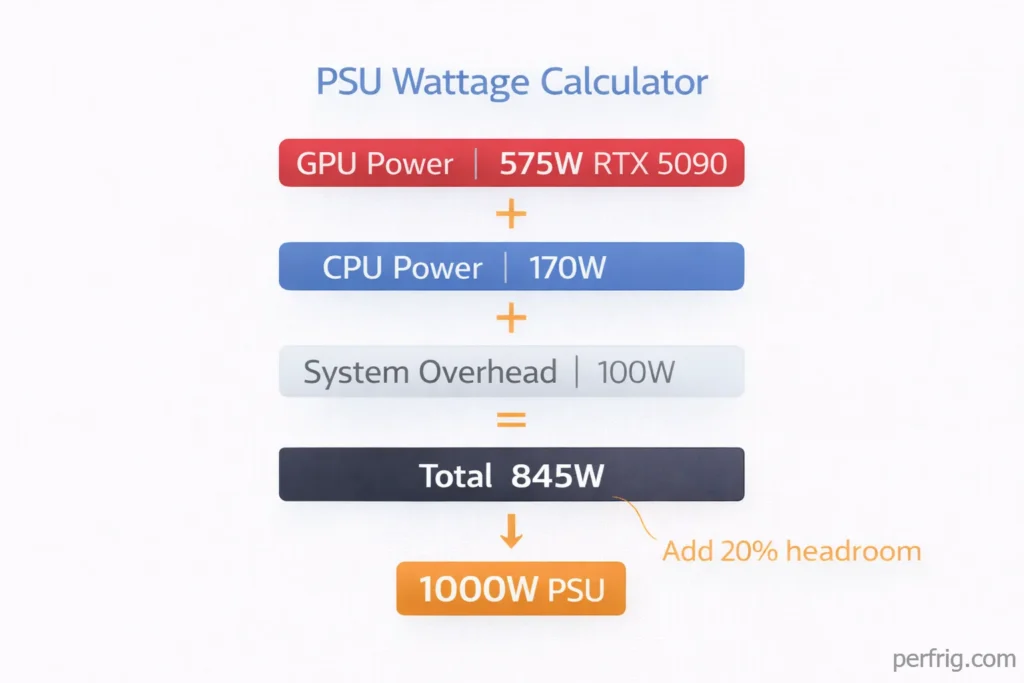
Budget builds running RTX 4060 Ti and Ryzen 5 chips need around 350W sustained, making 550W adequate. The key is matching PSU capacity to actual requirements rather than buying the biggest wattage available.
80+ Certifications: Efficiency That Matters
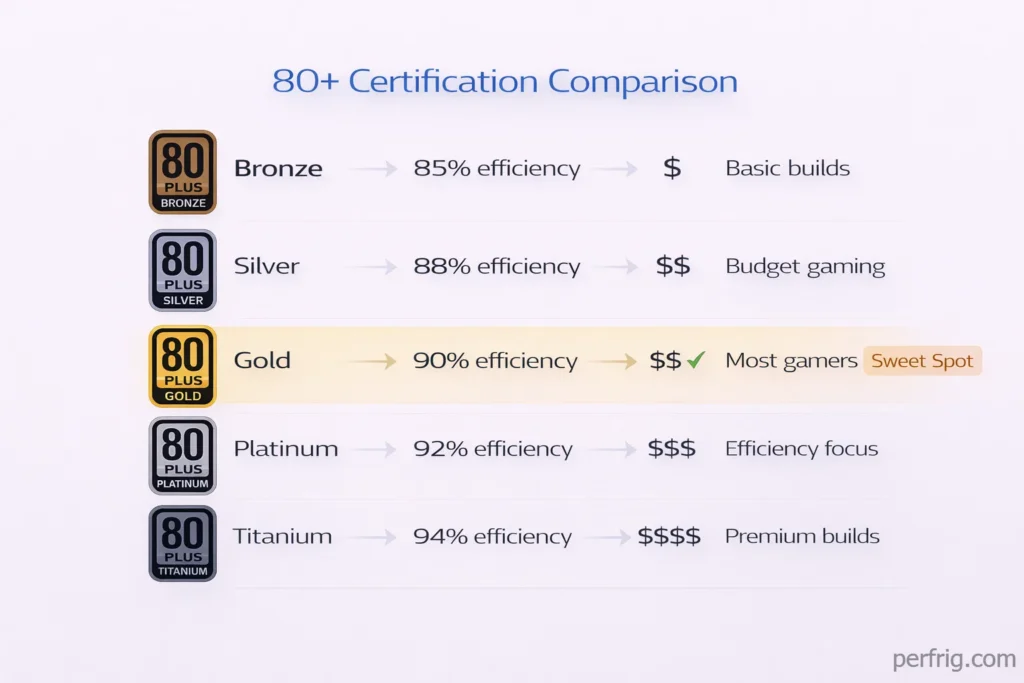
80+ ratings measure efficiency—how much AC power converts to usable DC power versus waste heat. Higher efficiency means lower bills and cooler operation.
80+ Bronze (85% efficient) works for budgets but wastes more as heat. 80+ Gold (90% efficient) hits the sweet spot—better efficiency without Platinum/Titanium premiums that rarely justify costs. Over years, Gold efficiency pays for itself through electricity savings.
Modular vs Non-Modular
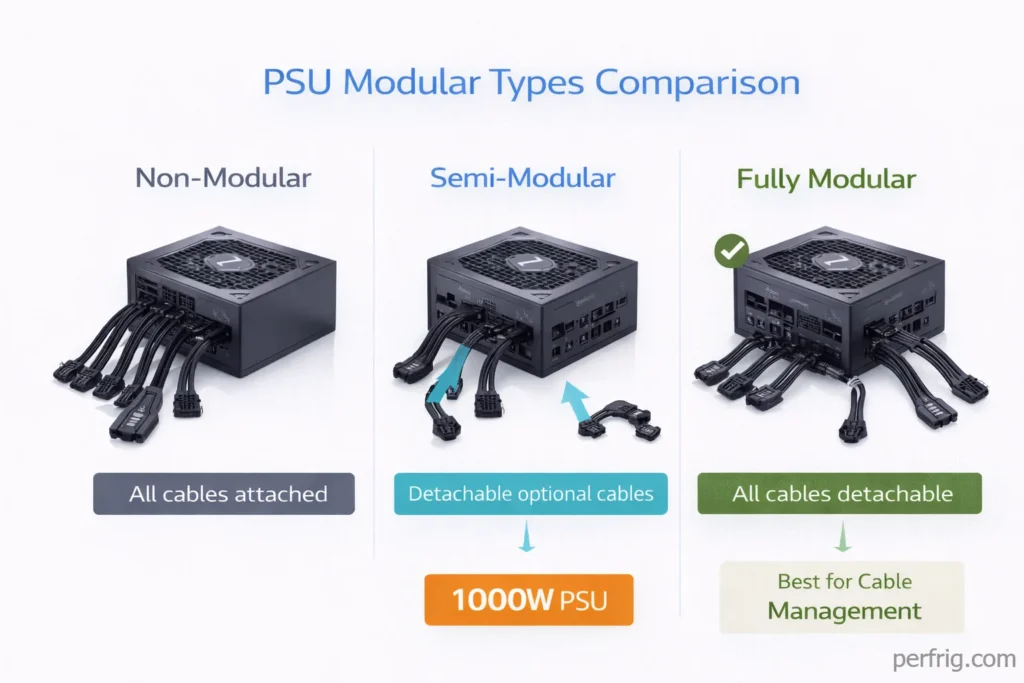
Fully modular PSUs let you connect only the cables you need, improving airflow and aesthetics. Non-modular units have all cables permanently attached, creating cable management nightmares in modern cases with transparent side panels.
Semi-modular splits the difference—essential cables (24-pin motherboard, 8-pin CPU) are permanent while optional cables (SATA, PCIe) detach. For most builders, semi-modular provides sufficient flexibility at lower cost than fully modular options.
Critical Connectors for 2026
The 12V-2×6 connector matters enormously for RTX 50-series GPUs. This replaces the problematic 12VHPWR connector that melted on RTX 40-series cards when improperly seated. The new standard includes additional sense pins preventing operation if the connection isn’t fully secure.
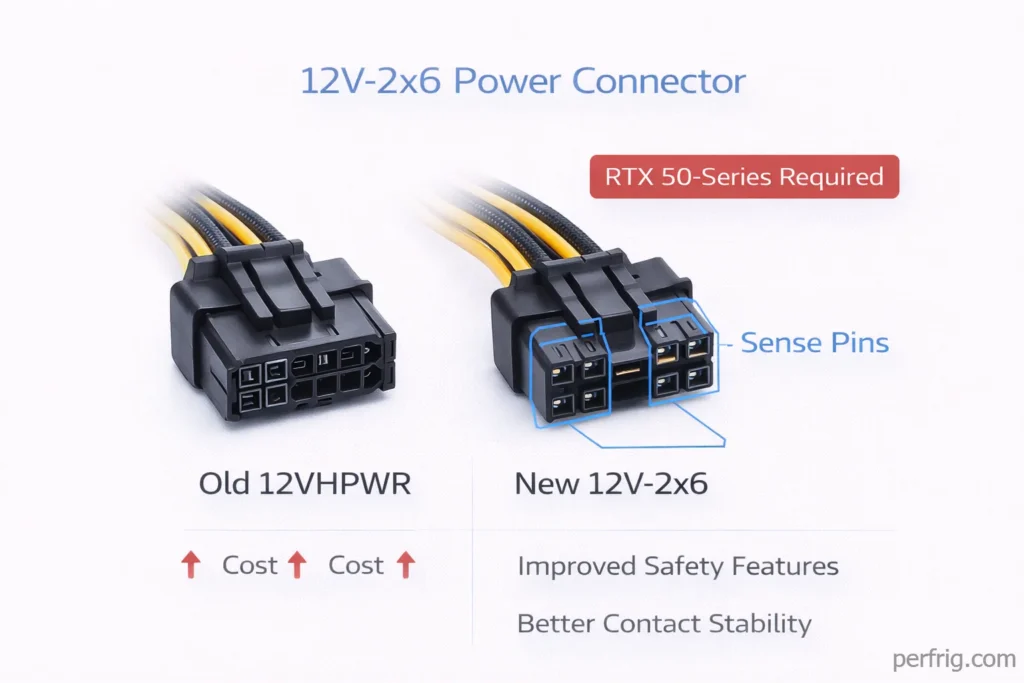
Buying a PSU without native 12V-2×6 support for an RTX 5090 build means using adapters—the exact scenario that caused melting issues with previous generation cards. Pay extra for native support. Your $2,000 GPU depends on it.
Older GPUs use standard 8-pin PCIe connectors. Budget cards need one or two 8-pin cables, while high-end RTX 4090 cards typically require three. Check your GPU specifications before buying a PSU to ensure sufficient connectors.
Best PSUs by Budget and System Type
Budget Gaming Builds (550-650W)
Corsair RM550x (2021)
- Wattage: 550W
- Efficiency: 80+ Gold
- Modular: Fully modular
- Price: ~$80
- Best for: RTX 4060, Ryzen 5 systems
This PSU handles mid-range components effortlessly with Gold efficiency keeping electricity costs reasonable. Fully modular design aids budget case builds where cable management matters. Ten-year warranty signals build quality that lasts multiple upgrade cycles.
Thermaltake Toughpower GF1 650W
- Wattage: 650W
- Efficiency: 80+ Gold
- Modular: Fully modular
- Price: ~$85
- Best for: RTX 4060 Ti, Ryzen 7 systems
The extra 100W provides headroom for modest GPU upgrades without PSU replacement. Hydraulic bearing fan runs quietly even under sustained loads, important for living room gaming PCs.
Mid-Tier Gaming (750-850W)
Seasonic FOCUS GX-850
- Wattage: 850W
- Efficiency: 80+ Gold
- Modular: Fully modular
- Price: ~$130
- Best for: RTX 4080, Ryzen 9 systems
Seasonic builds some of the most reliable PSUs available with failure rates well below industry average. This unit handles RTX 4080 power demands comfortably while leaving significant upgrade headroom. Hybrid fan mode keeps the unit silent during light loads.
High-End Gaming (1000W)
Corsair RMx Shift 1000W
- Wattage: 1000W
- Efficiency: 80+ Gold
- Modular: Fully modular
- Price: ~$180
- Best for: RTX 4090, high-end Ryzen/Intel
The RMx series represents Corsair’s premium tier with Japanese capacitors rated for extended lifespan. Cable layout accommodates large cases while hybrid fan mode maintains near-silence during typical gaming loads. Ten-year warranty backs the quality.
Extreme/RTX 5090 Builds (1200W+)
MSI MEG Ai1300P PCIE5
- Wattage: 1300W
- Efficiency: 80+ Platinum
- Modular: Fully modular
- Native 12V-2×6: Yes
- Price: ~$250
- Best for: RTX 5090 systems
This PSU includes native 12V-2×6 connector support eliminating adapter requirements for RTX 50-series cards. The extra wattage handles RTX 5090 power spikes safely while providing headroom for potential Super variants drawing even more power. ATX 3.0 compliance ensures compatibility with latest motherboard standards.
be quiet! Dark Power Pro 13 1300W
- Wattage: 1300W
- Efficiency: 80+ Titanium
- Native 12V-2×6: Yes
- Price: ~$330
- Best for: Silent RTX 5090 builds
Premium pricing buys best-in-class efficiency and near-silent operation even under full load. Titanium rating means less wasted heat and lower electricity costs over the PSU’s lifetime. Five-year warranty feels short compared to competitors but reflects confidence in reliability.
Common PSU Mistakes That Cost Money
Mistake 1: Buying Generic Brands
No-name PSUs from unknown manufacturers cut costs by eliminating safety features and using inferior components. When these units fail—and they do fail frequently—they damage connected hardware through voltage spikes or simply catch fire. The $30 saved on a generic PSU becomes $1,500 lost when it kills your GPU.
Stick to established brands: Corsair, Seasonic, EVGA, Thermaltake, be quiet!, MSI. These companies stake reputations on PSU reliability and provide warranty support when issues arise.
Mistake 2: Insufficient Wattage
Calculating power requirements wrong leads to system instability or complete failure under load. Online PSU calculators help, but add 20-30% headroom beyond calculated requirements. Games stress components in ways synthetic benchmarks don’t, and you want margin for those scenarios.
Budget for future upgrades too. Buying a 650W PSU for your current RTX 4060 Ti system makes sense, but upgrading to an RTX 5080 later means replacing the PSU too. Spending $20 more initially on 850W saves $100+ on future PSU replacement.
Mistake 3: Wrong Connector Types
The RTX 5090 melting connector saga taught expensive lessons. Using adapters to convert older 8-pin connectors to 12V-2×6 creates points of failure—connections that aren’t fully seated cause resistance, resistance creates heat, heat melts plastic. Pay for native connector support matching your GPU.
Mistake 4: Ignoring Efficiency Ratings
80+ Bronze PSUs seem like smart budget choices until electricity bills arrive. The efficiency difference between Bronze and Gold means roughly $15-25 annually in wasted electricity for systems running several hours daily. Over a PSU’s 5-10 year lifespan, Gold efficiency pays for its higher upfront cost while generating less heat your case fans must exhaust.
Installation and Safety Tips
Never mix modular cables between PSUs—cables aren’t universal and wrong cables short components. Use only cables included with your new unit.
Mount PSUs fan-down if your case has bottom ventilation, pulling cool air from outside. Without bottom vents, fan-up works but runs warmer.
Test outside the case before full installation—connect motherboard only and jump power pins to catch DOA units early.
The Bottom Line
Don’t cheap out on PSUs. Spending $80-150 on quality power supplies from reputable brands protects thousands of dollars in components while providing stable, efficient power for years. For RTX 5090 systems, native 12V-2×6 support isn’t optional—it’s mandatory to avoid melting connectors and potential hardware damage.
Choose wattage based on actual component requirements plus 20-30% headroom. Target 80+ Gold efficiency for the sweet spot between cost and electricity savings. Buy fully modular or semi-modular for cable management unless budget absolutely demands non-modular.
Recommended wattages: 550-650W for budget builds, 750-850W for mid-tier, 1000W for high-end RTX 4090 systems, and 1200-1300W minimum for RTX 5090 monsters. These aren’t suggestions—they’re requirements for stable, safe operation.
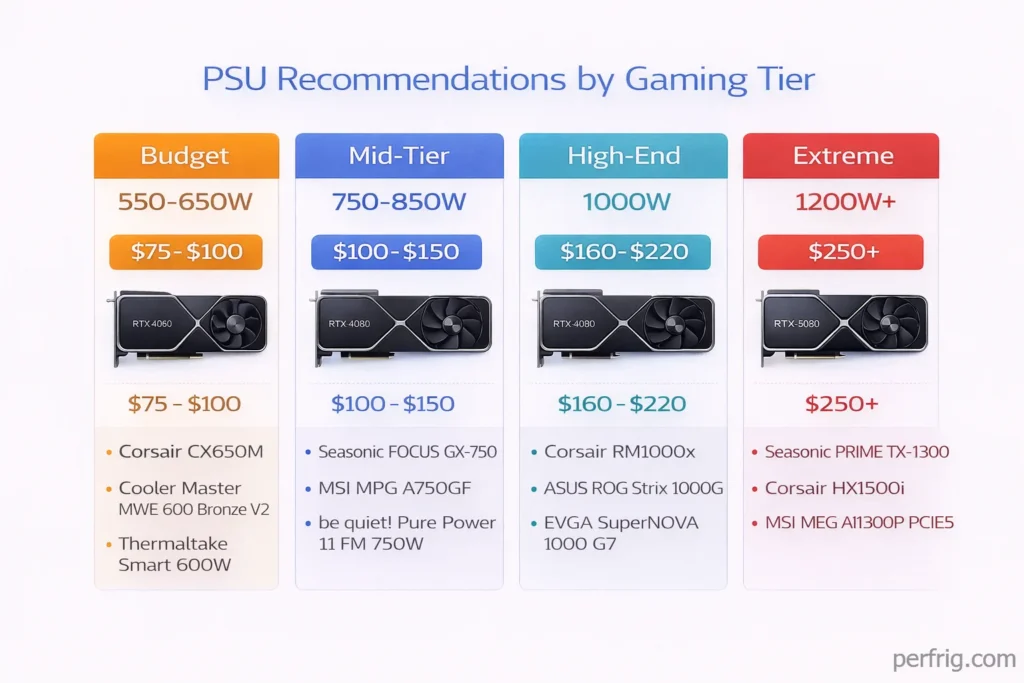
The PSU is the one component that can destroy everything else when it fails. Spend appropriately, buy from reputable brands, and your system will thank you with years of stable, reliable performance.











Join the Discussion