
Why 1440p still wins, what panel technology actually changes in daily use, and which monitors are worth your money right now.
There is a reason 1440p has held the title of “sweet spot” for gaming monitors for several years running, and 2026 has not changed that. At this resolution you get enough pixel density to make a real visual difference over 1080p without demanding the GPU muscle that 4K requires for smooth performance. In practice, what you will actually notice is that games look sharp without the need to either compromise your settings or spend on a flagship graphics card to push decent frame rates.
This guide covers why 1440p makes sense for most setups right now, how panel technology choices actually feel in use, what refresh rate you should be targeting, and where the money goes at different price points.
Why 1440p still makes sense in 2026
The short version: 4K gaming is still expensive to do properly and 1080p on a large screen shows its limits quickly. 1440p sits between them in a way that practicaly every mid-range to upper-mid GPU handles well.
On a 27-inch monitor, which is the most common size for desktop gaming, 1440p delivers around 109 pixels per inch. That is enough to make text crisp, game textures detailed, and fine details visible without requiring a magnifier. 1080p on the same size panel gives you around 81 PPI, and day to day, this matters more than the spec sheet suggests. The difference is not subtle once you have seen it.
The GPU side of the equation still favors 1440p heavily. An RTX 4070 or RX 7800 XT handles 1440p at high settings with plenty of frame rate headroom. Doing the same at 4K requires stepping up to cards that cost significantly more. For most people building or upgrading a gaming PC in 2026, 1440p is the resolution that gets the most out of a realistic GPU budget.
IPS vs OLED at 1440p: what you actually feel
This is where the buying decision gets more interesting. Both IPS and OLED panels are widely available at 1440p in 2026, and the experience of each is genuinely different in ways that go beyond specification numbers.
IPS panels at 1440p are the mature, reliable choice. Colors are accurate, viewing angles are consistent, and the technology is well understood. Modern IPS monitors in this category have reached response times and refresh rates that were high-end territory two years ago. The weakness of IPS remains backlight bleed and what is called IPS glow, a cloudy brightening in the corners of the screen when displaying dark content. In competitive games where you are looking at bright HUDs against varied backgrounds, you will rarely notice it. In slower-paced games with dark atmospheric environments, after a few hours you start to notice it more than you expect.
OLED at 1440p delivers something genuinely diferent. Per-pixel lighting means true blacks and infinite contrast. In dark scenes, the difference is not just technical, it changes how games feel to play. The concern with OLED has always been burn-in risk, and while modern OLED monitors have improved significantly with built-in compensation features, it remains a real consideration for anyone who displays static elements for long periods. If your gaming sessions involve long stretches with a static HUD or you use the monitor for productivity alongside gaming, it deserves thought. For pure gaming use with reasonable variety, current OLED panels have become much more practical.
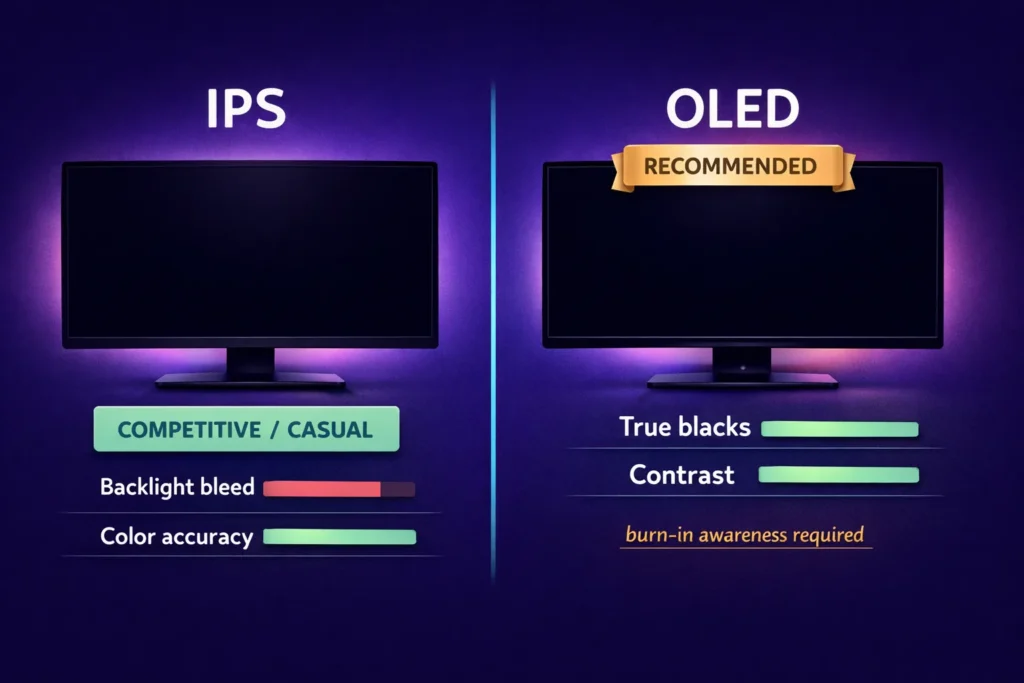
The honest framing is this: IPS is safer and cheaper for most use cases. OLED is a meaningfully better experience for the right user, at a higher price and with some ongoing awareness required.
Refresh rate: where to draw the line
At 1440p in 2026, the baseline for a gaming monitor should be 144Hz. Below that and you are leaving performance on the table that your GPU can realistically provide in most games.
The more relevant question is whether to go for 165Hz, 180Hz, or 240Hz. For competitive players who prioritize frame rate above everything else, 240Hz at 1440p is achievable in less demanding titles and makes a genuine difference in games where reaction speed matters. For casual to mid-core gaming, the jump from 144Hz to 240Hz is much less noticeable than the jump from 60Hz to 144Hz was.
The sweet spot for most people is 165Hz to 180Hz. Monitors in this range are well-priced, widely available, and match what a mid-range GPU can sustain in the games where high frame rates actually matter. I know this sounds like splitting hairs, but the price difference between 165Hz and 240Hz panels is often significant enough that the money goes further elsewhere.
Variable refresh rate support through G-Sync Compatible or FreeSync Premium is a standard feature at this tier and worth prioritizing. The smoothness it provides at frame rates below your monitor’s maximum is noticeable in daily use.
Top picks by budget
At the entry level of the 1440p market, around 200 to 300 dollars, IPS panels at 144Hz to 165Hz represent strong value. Monitors from AOC, Gigabyte, and MSI compete closely in this range. The experience is solid and the compromises are minor: typically slower response times than pricier options and less accurate factory calibration.
In the mid-range from 300 to 500 dollars, the options open up considerably. This is where IPS panels hit their best balance of response time, color quality, and refresh rate. The LG 27GP850-B and similar panels from this generation remain strong references. At the upper end of this range, some OLED options become available and are worth considering if the use case fits.
Above 500 dollars, OLED becomes the dominant reason to spend more. QD-OLED specifically has become a compelling technology at 1440p: the quantum dot layer adds saturation and brightness that standard WOLED does not match. If the budget allows and the use case fits, this tier delivers a genuine step up in daily experience.
Common mistakes to avoid
Buying a 1440p monitor with a 60Hz refresh rate. These exist and they are almost always a compromise not worth making in 2026. The price difference to reach 144Hz is small enough that it is rarely justified.
Prioritizing peak brightness specifications over real-world panel behavior. HDR marketing numbers on many monitors in this segment do not translate to meaningful HDR experiences. Local dimming quality matters far more than peak nit claims, and many IPS monitors at 1440p do not have the zone count to deliver HDR that actually improves the image.
Ignoring panel size. A 27-inch 1440p monitor and a 32-inch 1440p monitor are very different experiences. Pixel density drops significantly at 32 inches, and whether that bothers you depends on viewing distance. At a typical desk setup of 50 to 60 centimeters, 27 inches tends to feel right. At a larger desk or from further back, 32 inches can work well.
The 1440p market in 2026 is the most competitive it has ever been. More choice at more price points, with panel quality that was genuinely impressive hardware two years ago now available at mainstream prices. Getting it right comes down to understanding which decisions actually change how the monitor feels in use, and which are numbers on a box.










Join the Discussion