
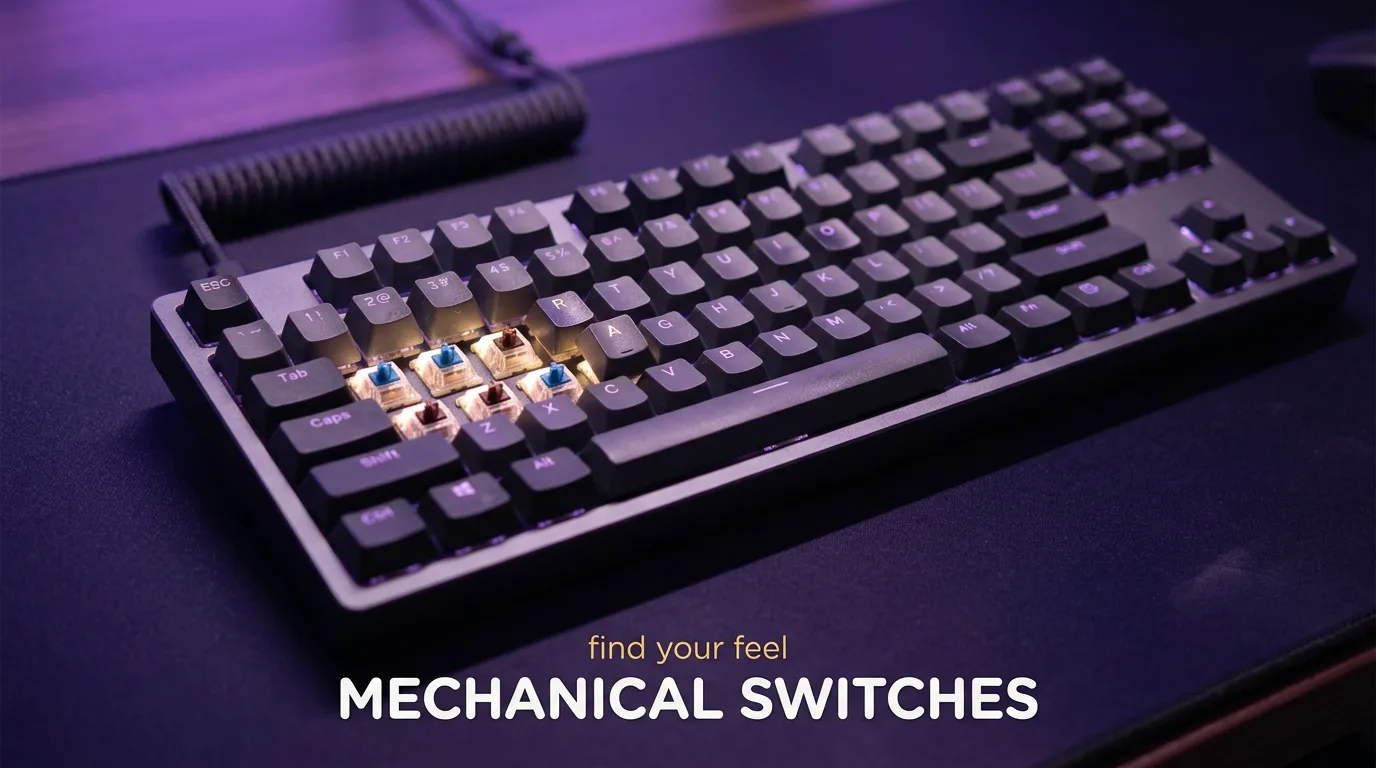
The switch underneath each key is the single biggest factor in how a keyboard feels and sounds, and most people pick one based on a YouTube video rather than what their hands actually prefer after three hours of use. The feel of it is hard to describe, but I’ll try, because getting this right changes how enjoyable your setup is every single session.
Linear, tactile, or clicky: what you’re actually choosing between
Linear switches move straight down with no feedback bump and no click. The resistance builds gradually as you press, and the key registers somewhere in the middle of that travel. In practice, what you’ll actually notice is a smooth, quiet keystroke that your fingers can repeat quickly without any interruption in the motion. For gaming, this matters. Fast key presses in competitive titles benefit from a switch that doesn’t interrupt the stroke with feedback. Most competitive players lean linear for exactly this reason.
Tactile switches have a bump partway through the travel that you feel when the key registers. No audible click, just a physical confirmation. Day to day, this matters more than the spec sheet suggests. For players who type a lot alongside gaming, the tactile feedback reduces the tendency to bottom out keys, which means less fatigue over long sessions. The tradeoff is that the bump adds a fraction of resistance that some players find interruptive during rapid inputs.
Clicky switches add an audible click to the tactile bump. They feel satisfying in a way that’s genuinely hard to argue against if you’re typing. For gaming, the sound profile creates real problems depending on your environment: shared spaces, streaming with an open microphone, or late-night sessions where the noise carries. The click itself doesn’t offer any functional advantage over a tactile switch for gaming specifically.
Actuation force and travel: the numbers that actually matter
Switch specs list two numbers that are worth understanding. Actuation force, measured in grams, tells you how much pressure is needed to register a keypress. Travel distance, measured in millimeters, tells you how far the key travels before registering.
For gaming, lighter actuation (around 40-45g) allows faster inputs with less finger fatigue. The tradeoff is accidental keypresses if your fingers rest on the keys. Heavier switches (55-65g) give more deliberate control but slow down rapid sequences slightly. Most gaming-oriented linears sit around 45g, which is a practicaly universal starting point for players new to the category.
Pre-travel (the distance before the actuation point) affects how snappy a switch feels. Shorter pre-travel means the key registers earlier in the press. Some competitive players specifically seek out switches with minimal pre-travel for this reason, though I know this sounds minor. After a few hours with a short pre-travel switch versus a standard one, you start to notice the difference in how quickly your inputs register relative to your intent.
Hall Effect magnetic switches: the option most buyers overlook
Hall Effect switches use magnetic fields instead of physical contact to register keypresses. The practical result is a switch with no mechanical wear surface, which means the degradation that causes double-registering inputs in traditional switches doesn’t occur in the same way.
More relevantly for gaming: Hall Effect switches allow adjustable actuation points. You can set the registration point earlier or later in the travel depending on what the game demands, and some implementations allow rapid trigger functionality, where the switch resets immediately after actuation rather than waiting for the key to return to neutral position. For fast-paced games that reward rapid repeated inputs, this is a genuinely useful feature.
The downsides are price and availability. Hall Effect keyboards sit at a premium compared to traditional mechanical options, and the switch feel varies more between manufacturers than it does in the established linear and tactile categories. The technology is improving quickly though, and second-generation implementations have addressed most of the early feel concerns.
Sound profile: it matters more than you expect
Sound is a functional consideration, not just an aesthetic one. A loud keyboard during ranked matches, streaming sessions, or calls is a source of friction that accumulates session after session.
Linears with a dampened bottom-out are the quietest option in the traditional mechanical category. Tactile switches produce a moderate thock or bump sound depending on the housing. Clicky switches range from high-pitched clicks to deeper clacks depending on the specific design, and none of them are quiet.
Case material and desk surface affect perceived sound as much as the switch itself. A keyboard with a gasket mount or silicone dampening layer sounds diferent on the same switches compared to a standard tray-mount board. If sound matters to your setup, the full keyboard construction is worth considering alongside switch type.
Recommendations by play style
For competitive gaming (FPS, battle royale, fighting games): linear switches with light to medium actuation in the 40-50g range. Short pre-travel is a bonus. Hall Effect with rapid trigger is worth the premium if you play titles that support it and spend serious time in competitive modes.
For mixed use (gaming plus regular typing work): tactile switches with moderate actuation around 50-55g. The feedback helps with typing accuracy without noticably hurting gaming performance. Avoid heavy tactile options above 60g unless you definately prefer deliberate key presses.
For casual and immersive gaming where feel and atmosphere matter more than milliseconds: this is where personal preference has the most room. Tactile and clicky switches both work fine here, and the choice comes down to whether you enjoy the sound and the feedback ritual of a clicky switch or prefer something quieter.
One practical note regardless of category: try before you buy if at all possible. Switch testers cost very little and save you from committing to a keyboard you’ll replace in three months because the feel isn’t what you expected from a spec sheet.












Join the Discussion